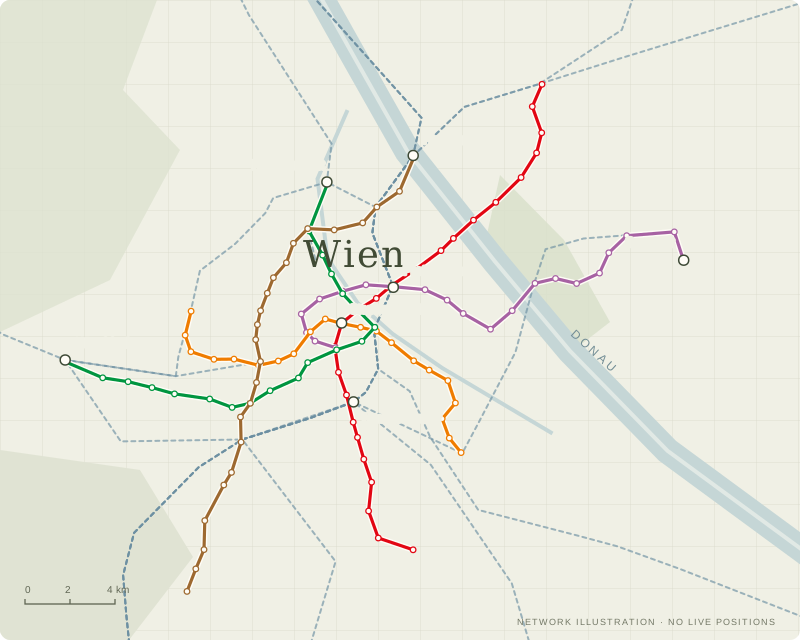
AN INDEPENDENT VIENNA RAIL PROJECT

See Vienna
in motion.

A network-analysis layer beyond route planning: transparent train-position estimates, delay patterns and service signals across Vienna.

iDeparture data is live; train locations are estimates—not onboard GPS.
BUILT AROUND VIENNA’S NETWORK
U-Bahn
S-Bahn
Trams
Show only the layers you need.
A COMPLEMENT TO OFFICIAL TRAVEL APPS

From “how do I get there?”
to “what is happening across the network?”

WienMobil and ÖBB Scotty focus on passenger essentials such as journey planning, live travel information and service updates. Vienna Rail’s added layer is network-wide analysis: patterns, estimates and model signals in one place.

01 / SEE THE NETWORK

Train-position estimates, with the source exposed

Follow U-Bahn movement inferred from departure updates alongside S-Bahn timetable estimates and optional tram layers. The map labels estimates as estimates—not as onboard GPS.

NETWORK-WIDE · SOURCE-LABELED
02 / FIND THE PATTERN

Delay history beyond one journey

Rank observed delay by train, station and line, compare rolling time windows, and build longer-term reports as the archive grows.

RANKINGS · ROLLING WINDOWS · HISTORY
03 / SPOT SERVICE SHAPE

Where gaps or bunching may happen

Headway monitoring points to the affected line and corridor or station. Dwell-time and recovery signals add context, with experimental status kept visible.

GAPS · BUNCHING · DWELL · RECOVERY
04 / TEST WHAT-IFS

Scenarios, spatial context and model transparency

Explore a delay scenario, inspect the 200 m grid where observations exist, and see which models are collecting data, monitored or evaluated. Not every signal is a trained or validated model.

SCENARIOS · SPATIAL LAYERS · MODEL STATUS

Use the right tool for the job. Official apps remain the source for operator-issued notices, confirmed journey advice and ticketing. Vienna Rail is an independent analysis companion—not a replacement.

REAL APP SCREENS · CAPTURED 15 OCT 2026

See what the map
actually shows.

These are captures of the live Vienna Rail interface—not concept artwork. The displayed feed and counts change over time; the notes explain how to read each view.

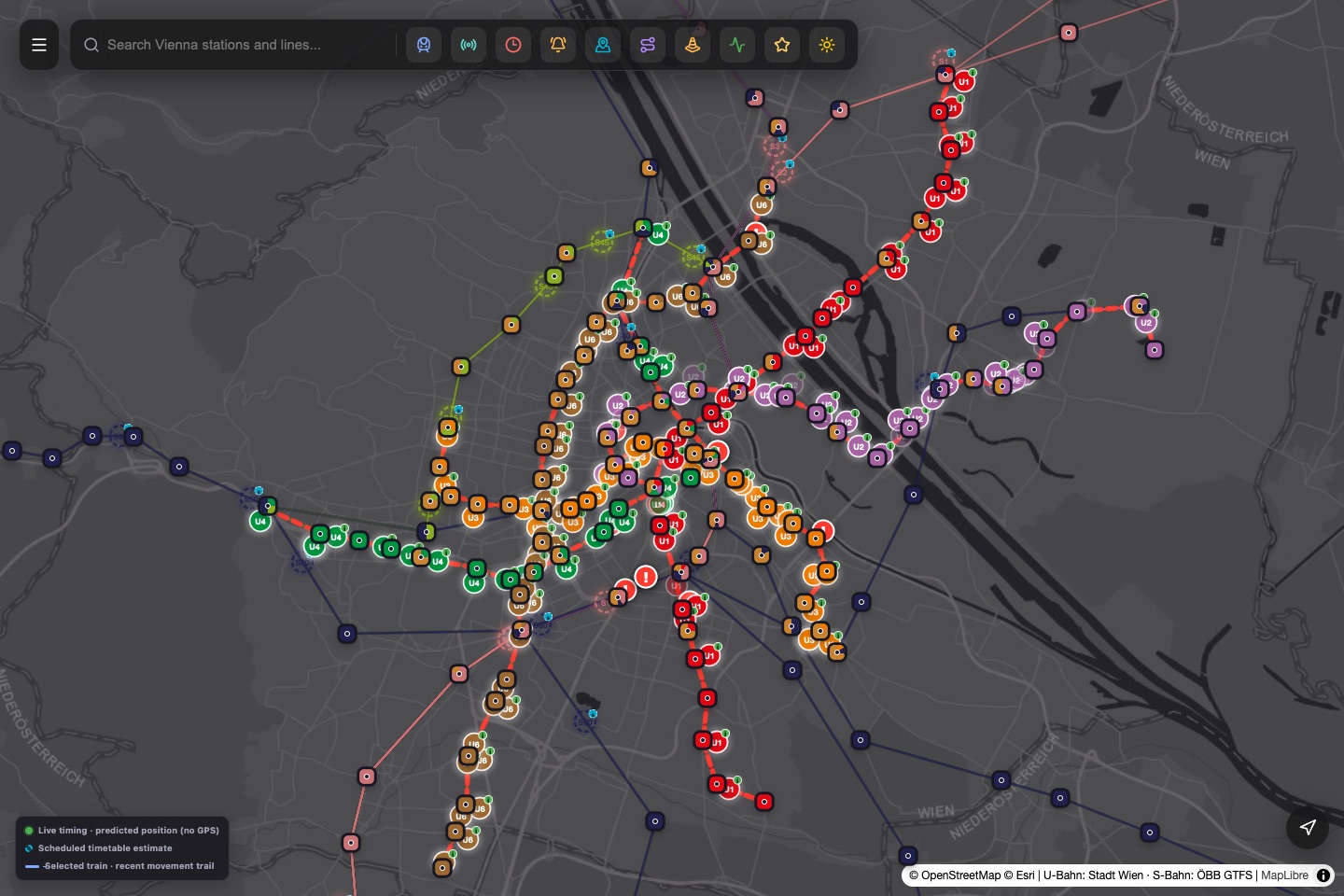
Actual Vienna Rail map screen with U-Bahn and S-Bahn routes, train markers, search and a source-status legend.
01 · NETWORK MAP

One map, multiple evidence types

Route colours distinguish lines; the map legend separates live departure timing with inferred positions from scheduled timetable estimates. A train marker is not an onboard GPS fix.

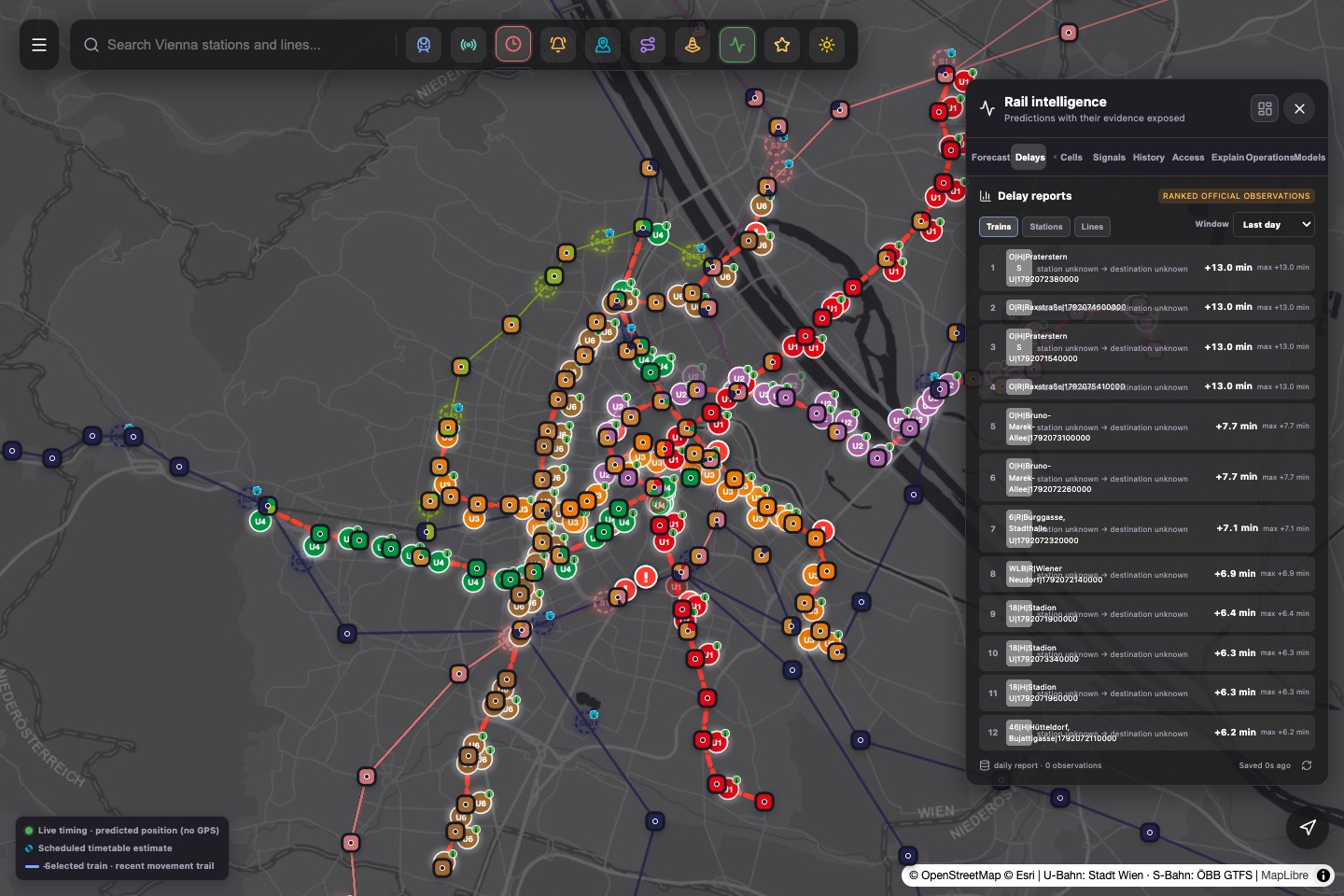
Actual Vienna Rail delay desk open over the map, ranking available official delay observations.
02 · DELAY DESK

Find the largest reported delays

Rank the operator-reported observations by train, station or line and choose a time window. Missing station metadata can appear as “unknown”; the ranking only covers records the source provides.

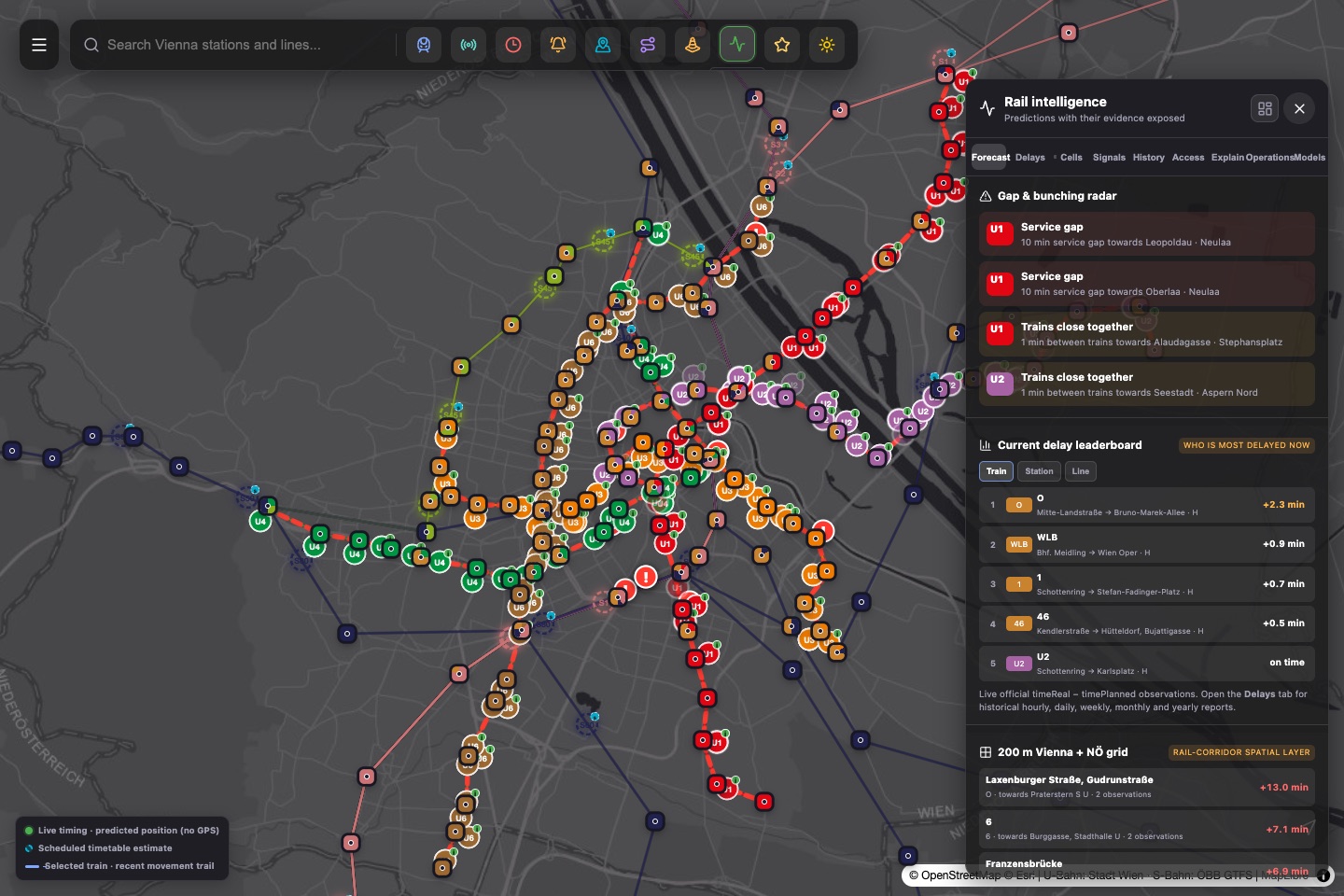
Actual Vienna Rail intelligence panel showing gap and bunching signals, a delay leaderboard and spatial grid summaries.
03 · RAIL INTELLIGENCE

Explore service patterns and context

Monitoring signals highlight possible headway gaps and close-running trains; the grid summarizes observations where data exists. These are decision-support indicators, not verified causes or operating instructions.

Screens captured from the public app on 15 October 2026. Live values, train counts and source coverage can change after capture.

ONE CITY, MORE CONTEXT

A map that opens
into a control room.

Start with the network. Then move from a train or station into the information behind it—from departures and delay history to emerging service patterns.

01 / SEE

Follow the whole network

Explore U-Bahn, S-Bahn and optional tram layers, search for favourite stations, and open a train or station for its available details.

  • Line filters and uncluttered optional layers
  • Station departures and selected-train details
  • Nearby stations with optional device GPS
MAP · STATIONS · TRAINS
02 / UNDERSTAND

See where delays collect

Rank reported delay patterns by train, station and line. Explore rolling time windows and compare recent conditions with the wider history being collected.

  • Delay summaries and station/line rankings
  • Prediction ranges beside live departure evidence
  • Hourly and longer-period reporting as history grows
DELAY DESK · HISTORY · COMPARISON
03 / ANTICIPATE

Spot patterns earlier

Model and rule-based signals turn repeated observations into useful prompts—not automatic operational commands.

  • Delay and dwell-time estimates
  • Headway gaps, bunching and recovery signals
  • Scenario exploration and service-impact context
PREDICTIONS · SCENARIOS · SIGNALS
FROM DOTS TO DECISIONS

Useful signals.
Honest confidence.

Vienna Rail brings several kinds of evidence into one place. Each signal keeps its source and certainty visible, so a timetable estimate is never dressed up as a GPS fix.

Open the map and explore
A

Delay outlook

Estimate how a reported delay may evolve, and compare the model with the live departure estimate.

MODEL
B

Headway & bunching

Flag unusually large or small gaps, with the station or corridor where the pattern appears.

MONITORED
C

Delay, dwell & recovery

Explore station-level delay summaries, dwell-time indicators and post-disruption recovery signals.

EARLY SIGNAL
D

Network context

Bring together service messages and available weather, mobility or event context where a source is connected.

CONTEXT

Model availability and validation status can vary by feature. The in-app model dashboard shows the current status and evaluation metrics; experimental signals should be read as indicators, not guarantees.

HOW THE SIGNALS ARE MADE

Evidence in.
Estimates out.

The platform keeps published facts, derived estimates and model outputs distinct. That separation is central to understanding what a marker or prediction can—and cannot—tell you.

01

Collect

Read public Wiener Linien departure and service-message feeds, plus published ÖBB timetable data and other connected open sources.

02

Align

Match departures to stations, lines and planned times. Keep source timestamps and known coverage gaps alongside the observations.

03

Estimate

Interpolate train movement from departure predictions and route timings. A marker describes an estimate, not a device installed on the train.

04

Evaluate

Train on earlier observations, test on later held-out data, compare with a simple baseline, and show the scores in the app.

READ THE MARKER, NOT JUST THE MAPSOURCE → DISPLAY
●
Live departureOperator-reported departure timing
OBSERVED FEED
◉
U-Bahn positionEstimated from departures and route timing
INFERRED
○
S-Bahn movementInterpolated between timetable calls
SCHEDULED
OPEN DATA · CLEAR LIMITS

Built to be useful.
Designed to be candid.

Vienna Rail is an independent project—not an official Wiener Linien or ÖBB service. It complements operator information with map-based estimates and experimental analysis.

⌖

Your location stays yours

GPS is optional. The app compares your device location with the station list on your device; it does not send the coordinates to the app server.

↗

Signals are decision support

Predictions can be wrong. They are not operator instructions, a safety system or a substitute for official service notices.

AI

AI advisor status

The optional GPT-based advisor is currently disabled in the public app. No AI API key is exposed in the website.

GOOD QUESTIONS

Before you ride.

A few important details for using the map and reading its predictions.

Are the train dots exact GPS locations?

No. Wiener Linien’s public real-time feed provides departure predictions, not train GPS. U-Bahn locations are estimated from those predictions and route timing. ÖBB S-Bahn locations are scheduled timetable interpolations.

How quickly does the map refresh?

The app polls its shared snapshot frequently (about every 1.5 seconds). That describes the app’s request cycle, not how often an operator changes its source data; network delays and source updates can affect the information shown.

Can I install Vienna Rail on my phone?

Yes. The site is a Progressive Web App. On iPhone, open it in Safari, choose Share, then Add to Home Screen. GPS works only after you choose a location feature and grant permission.

Are the predictions all fully trained machine-learning models?

No. Some are rule-based or monitored baselines; other candidates may still be collecting labels or awaiting validation. Check the in-app model dashboard for current status, sample counts and scores.


YOUR CITY, WITH MORE CONTEXT

Take a closer look.

Open the map, choose a line, and follow the evidence from station to station.

Open Vienna Rail